
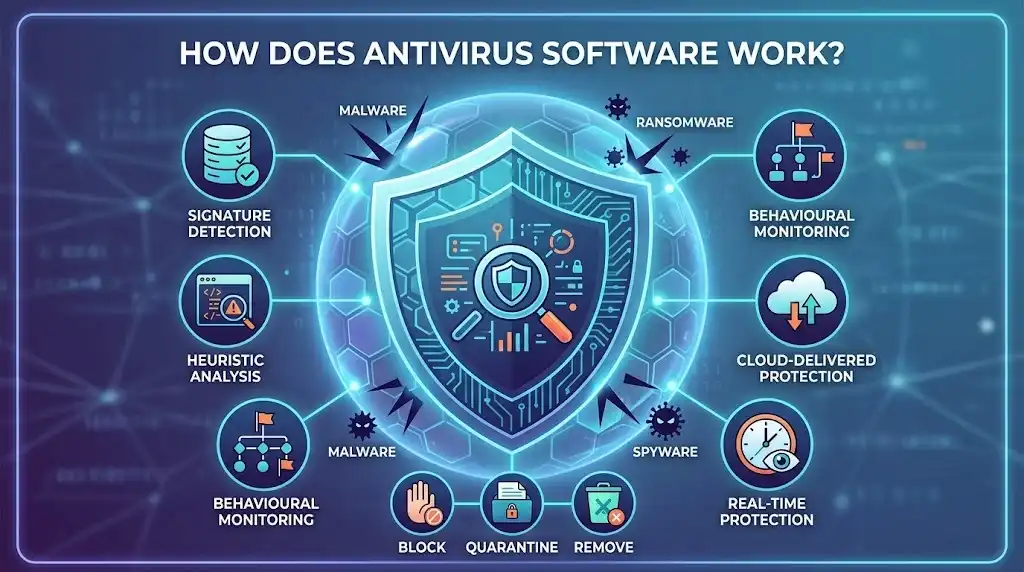
Antivirus software protects a device by continuously examining files, applications, processes, websites and other activity for signs of malicious behaviour. Modern antivirus does far more than compare files against a database of known viruses: it combines signature detection with real-time monitoring, behavioural analysis, heuristics, cloud-based threat intelligence and other detection techniques to identify both known and emerging threats. When software detects a sufficiently suspicious threat, it can block execution, prevent access, quarantine the affected item or remove it, depending on the product and the type of threat detected.
Key Takeaways
- Antivirus software detects threats using multiple layers rather than relying on a single virus database.
- Signature detection remains useful for recognising known malware, but behavioural and heuristic techniques help identify previously unseen or modified threats.
- Real-time protection examines activity as files are opened, downloaded, executed or otherwise used.
- Web protection can prevent users from reaching malicious websites before a harmful download or interaction takes place.
- Cloud-assisted detection can provide faster intelligence about newly emerging threats than traditional update cycles alone.
- Antivirus software can quarantine or block detected threats, but it cannot guarantee that every attack will be prevented.
- A good antivirus product should match the device, operating system, threat exposure, required features and licensing needs of the user.
- Running multiple products with overlapping real-time protection can cause conflicts, so users should generally avoid installing several full antivirus products simultaneously. Malwarebytes specifically warns that running its software alongside another antivirus can cause compatibility and connectivity problems.
What Does Antivirus Software Actually Do?
Antivirus software is designed to detect, prevent and respond to malicious software. Although the name comes from computer viruses, modern products generally protect against a much wider range of malware, including ransomware, spyware, Trojans, worms, malicious scripts and potentially unwanted applications.
The basic process is:
- A file, application, website or process is encountered.
- The security software examines it using one or more detection methods.
- The software compares what it finds with known threat intelligence, suspicious patterns or behavioural indicators.
- If the item is considered malicious or sufficiently suspicious, the security product blocks, quarantines or otherwise contains it.
- The security engine records the event and may provide the user with information or remediation options.
Modern antivirus therefore operates more like a layered threat-detection system than a simple database of computer viruses.
Microsoft describes its current Windows protection as combining real-time, behaviour-based and heuristic protection with cloud-delivered protection.
How Antivirus Detects Malware
Signature-Based Detection
Signature-based detection identifies malware using characteristics associated with known malicious files.
A security vendor analyses malware and creates detection information that allows its software to recognise the threat. The antivirus engine can then compare files or other objects against that information.
This approach is particularly effective against known malware because the security product already has information describing what it is looking for.
The limitation is that a completely new malware sample may not yet have a corresponding signature. Malware authors can also modify malicious files to make simple identification more difficult.
That is why modern antivirus products use additional detection methods rather than depending exclusively on signatures. Malwarebytes describes traditional signature examination as one component of modern malware protection rather than the complete solution.
Heuristic Detection
Heuristic detection looks for characteristics associated with malicious software rather than requiring an exact match with a known malware signature.
For example, a program containing suspicious characteristics or attempting an unusual combination of system modifications may be treated as potentially dangerous even if the exact file has not previously been identified.
Heuristics help security software detect variants and previously unknown threats, although aggressive detection can sometimes produce false positives when legitimate software behaves in ways that resemble malware.
Behavioural Detection
Behavioural detection examines what software actually does while it is running or interacting with the operating system.
This matters because malware can change its appearance while retaining recognisable malicious behaviour.
A security engine may monitor activity such as:
- Attempts to modify important system files.
- Unexpected changes to startup mechanisms.
- Suspicious process activity.
- Attempts to exploit software vulnerabilities.
- Unusual changes to large numbers of files.
- Attempts to disable security controls.
- Network connections associated with suspicious activity.
Microsoft’s current documentation describes behaviour monitoring as continuously observing processes, file-system activity and other system interactions so that suspicious actions can be detected even when a threat does not match a conventional signature.
Cloud-Based Threat Detection
Many modern antivirus products use cloud services to supplement the security engine running on the device.
Instead of relying entirely on information already stored locally, the security software can communicate with a vendor’s cloud infrastructure when additional analysis or current threat intelligence is required.
Microsoft’s cloud-delivered protection, for example, can analyse suspicious files using heuristics, machine learning and automated analysis and can make determinations about previously unseen files rapidly.
Cloud assistance is particularly important when attackers release new malware faster than conventional security intelligence updates can be distributed.
The exact implementation varies between vendors, and cloud protection can have privacy and connectivity implications because some security decisions may involve sending information or samples to the provider.
How Real-Time Antivirus Protection Works
Real-time protection operates continuously rather than waiting for the user to start a manual scan.
When you download or open a file, launch an application or perform another monitored activity, the security software can inspect the relevant activity before allowing it to proceed.
A simplified example looks like this:
Download → inspection → threat assessment → allow or block
If the item is considered safe, it can normally continue.
If it is identified as malicious, the antivirus may prevent execution and quarantine the file.
If the software is suspicious but cannot be conclusively classified locally, a cloud-based service may provide additional analysis where supported.
Malwarebytes’ current real-time protection, for example, includes separate protection layers for malware, web threats and ransomware on supported platforms. Its malware protection monitors the device and can automatically quarantine detected malicious files.
Real-time protection is therefore fundamentally different from running an occasional manual scan. A manual scan can identify malware already stored on a device; real-time protection is intended to intervene while potentially dangerous activity is occurring.
How Antivirus Scans Files
A manual or scheduled antivirus scan systematically examines files and other locations selected by the security product.
Depending on the software and scan type, this can include:
- System files.
- Installed applications.
- Downloads.
- Temporary files.
- User documents.
- Startup locations.
- Memory or running processes.
- External storage.
- Other locations supported by the operating system.
A quick scan normally concentrates on areas where malware is most likely to be active. A full scan examines substantially more of the device and can take considerably longer.
Scan duration depends on factors such as the number and size of files, storage performance, system resources and the type of analysis performed.
A scan is not necessarily proof that a device is completely clean. Detection technology has limitations, encrypted or inaccessible content may restrict analysis, and new threats can emerge after the scan has completed.
What Happens When Antivirus Finds a Threat?
Antivirus software does not always immediately delete a detected file.
The response normally depends on the threat classification, product configuration and type of object involved.
Block
The software can prevent a malicious file or application from executing.
Blocking is particularly important for threats that have not yet been allowed to run.
Quarantine
The security product can isolate the suspicious file so that it cannot operate normally.
Quarantine provides a safer way of containing a detection while preserving the option to investigate or restore the item if it turns out to have been incorrectly classified.
Malwarebytes, for example, states that its malware protection automatically quarantines detected malware.
Removal
The antivirus may remove the malicious file or associated components from the system.
Removal does not necessarily mean that every consequence of an infection has been reversed. A sophisticated attack may already have changed settings, stolen information or affected other files before detection.
User Decision
Some products allow the user to review detections and choose what happens next.
This can be useful when legitimate software is incorrectly classified, but users should not restore a detection simply because they recognise the file name. A legitimate-looking program can still be compromised or bundled with unwanted components.
How Antivirus Protects Against Ransomware
Ransomware is malware that can encrypt or otherwise restrict access to files and then demand payment.
Traditional malware detection can identify known ransomware, but modern ransomware protection can also monitor behaviour associated with an attack.
For example, a security product may look for suspicious processes attempting to modify large numbers of files or otherwise behave like ransomware.
Malwarebytes currently provides dedicated ransomware protection in its paid protection product and describes it as a layer designed to detect and prevent malicious software from locking users out of systems and files.
Ransomware protection should not be treated as a substitute for backups. A properly maintained backup provides an additional recovery mechanism if ransomware succeeds, while antivirus is primarily intended to prevent or contain the attack.
How Antivirus Protects Against Malicious Websites
Modern antivirus protection often starts before malware reaches the computer.
Web protection can examine websites, URLs or other online destinations and block access when they are associated with malicious activity, phishing or other threats.
This is important because the safest malware file is one that never reaches the device.
Malwarebytes’ current Web Protection feature blocks web-based threats including scams, phishing sites and ransomware-related websites on supported platforms.
F-Secure Internet Security similarly provides Browsing Protection that blocks harmful websites and warns users about suspicious web pages before they are accessed. Its Banking Protection also checks websites used for banking and shopping.
Web protection does not make every website safe. New malicious domains can appear quickly, legitimate websites can be compromised, and social engineering can occur through channels that traditional web filtering does not fully control.
Antivirus Software Uses Multiple Layers
The strongest practical distinction between older and modern antivirus is the number of detection and prevention layers operating together.
A typical modern security product may combine:
| Protection layer | What it does | Why it matters |
|---|---|---|
| Signatures | Recognises known malware characteristics | Effective against established threats |
| Heuristics | Looks for suspicious characteristics | Helps detect modified or unfamiliar threats |
| Behaviour monitoring | Examines what software does | Can identify malicious activity during execution |
| Real-time scanning | Checks activity as it happens | Can block threats before or during execution |
| Web protection | Checks websites and online destinations | Can stop some threats before they reach the device |
| Cloud intelligence | Uses current remote threat analysis | Helps respond rapidly to emerging threats |
| Ransomware protection | Monitors ransomware-related behaviour | Adds protection against file-encrypting attacks |
| Exploit protection | Looks for attempts to exploit vulnerabilities | Helps defend against attacks targeting software weaknesses |
| Quarantine | Isolates detected items | Prevents contained threats from operating normally |
The exact combination differs between products. Microsoft Defender Antivirus, for example, combines always-on scanning, behaviour monitoring, heuristics and cloud-delivered protection.
Does Antivirus Detect New Viruses?
Yes, modern antivirus software can detect some previously unknown threats, but there is no guarantee that every new malware sample will be identified immediately.
Signature-based detection is strongest when the threat is already known. Behavioural, heuristic, machine-learning and cloud-assisted techniques can extend protection to threats that do not have an established signature.
Microsoft’s current “Block at first sight” technology illustrates this approach: when Defender encounters a suspicious file it has not previously identified, cloud analysis can use heuristics, machine learning and automated analysis to determine whether the file is malicious.
Detection therefore depends on the product’s technology, configuration, available threat intelligence, operating system and the characteristics of the attack.
Can Antivirus Stop Every Virus?
No.
Antivirus software significantly improves protection, but it cannot guarantee prevention of every malware infection or cyberattack.
Attackers can exploit newly discovered vulnerabilities, compromise legitimate services, use stolen credentials, persuade users to approve malicious actions or distribute threats that security systems have not yet classified.
Antivirus is one layer of security rather than a complete security strategy.
Keeping the operating system and applications updated, using strong authentication, maintaining secure backups, avoiding suspicious downloads and checking unexpected links all remain important.
What Is the Difference Between Antivirus and Anti-Malware?
The terms are now often used interchangeably.
Historically, antivirus products were primarily associated with computer viruses, while anti-malware tools covered a broader range of malicious software.
Modern antivirus products generally protect against much more than viruses. Malwarebytes, for example, describes its current security product as providing protection against malware, ransomware and other online threats rather than limiting protection to traditional viruses.
For a buyer, the more useful question is not whether a product calls itself antivirus or anti-malware, but what detection and prevention layers it actually provides.
Choosing Antivirus Software
The right antivirus product depends on the devices being protected and the level of protection required.
Windows Users
Windows 11 already includes Microsoft Defender Antivirus, which provides real-time, behaviour-based and heuristic protection together with cloud-delivered protection. Microsoft also states that Defender Antivirus automatically turns off when another antivirus application is installed and can turn back on when that product is removed.
A third-party antivirus can therefore make sense when its additional features, interface, cross-platform support or protection capabilities match your requirements.
Users Wanting Broad Device Protection
F-Secure Internet Security protects Windows, macOS, Android and iOS devices and combines antivirus with browsing, scam, banking and ransomware protection. Current supported desktop and mobile operating systems include Windows 11, Windows 10 version 21H2 or later, macOS 13 Ventura or later, iOS 18 or later and Android 11 or later.
F-Secure Total is appropriate when antivirus is only one part of the required protection. It combines antivirus with additional privacy, VPN, identity and scam-protection capabilities, making it a broader security package rather than simply an antivirus engine. F-Secure currently offers Total alongside its other protection products.
Users Prioritising Layered Malware Protection
Malwarebytes provides real-time protection against malware and potentially unwanted programmes, together with web, ransomware and exploit protection on supported platforms. Its current documentation specifically identifies separate protection layers rather than relying on a single scanning mechanism.
Malwarebytes also distinguishes its free malware-cleanup capability from its paid real-time protection. The free product can be useful for scanning and cleaning an already affected device, whereas real-time protection is intended to prevent threats from executing in the first place.
Mac Users Wanting Antivirus Plus System Tools
MacKeeper is specifically focused on macOS and combines antivirus with cleaning, performance and privacy tools.
Its current antivirus can monitor files in real time, perform full and custom scans, update its virus database daily and quarantine detected threats. MacKeeper currently lists macOS 10.15 or later as its system requirement.
MacKeeper is therefore particularly relevant to Mac users who want antivirus protection alongside maintenance and privacy tools rather than a standalone security product.
Users Considering VIPRE Antivirus
VIPRE’s documented antivirus technology has included real-time behaviour monitoring, machine-learning-based detection and cloud threat intelligence alongside protection against ransomware, phishing, exploits and other malware. These capabilities are designed to extend protection beyond conventional signature-based detection.
Because product editions, availability and feature sets can change, check the current offering for your market before purchasing.
Antivirus Comparison
| Product | Particularly suitable for | Key protection approach | Platform focus |
| F-Secure Internet Security | Users wanting conventional antivirus plus web and banking protection | Antivirus, ransomware, browsing, scam and banking protection | Windows, macOS, Android, iOS |
| F-Secure Total | Users wanting antivirus combined with privacy and identity features | Antivirus plus VPN, identity and scam protection | Windows, macOS, Android, iOS |
| Malwarebytes | Users prioritising layered malware, ransomware and web protection | Real-time malware, web, ransomware and exploit protection | Windows, macOS, Android, iOS, with feature availability varying by platform |
| MacKeeper | Mac users wanting security and maintenance tools together | Real-time antivirus, scanning, quarantine and additional Mac utilities | macOS |
| VIPRE Antivirus | Users considering behaviour-based and cloud-assisted antivirus protection | Behaviour monitoring, machine learning and threat intelligence | Availability and supported editions should be checked before purchase |
The most important distinction is not simply the number of features. A product should provide the protection layers that correspond to your actual risks and work correctly on the devices you use.
Should You Run Two Antivirus Programs?
Generally, no.
Two products with overlapping real-time protection can interfere with one another because both may attempt to inspect the same files, processes and network activity.
Malwarebytes explicitly warns that installing its application alongside another antivirus can cause problems including one product blocking the other, loss of functionality, internet connectivity problems and system crashes.
A separate on-demand scanner can sometimes be used alongside a primary security product, but users should check the vendor’s compatibility guidance before enabling overlapping real-time protection.
What Antivirus Software Cannot Do
Antivirus software is not a replacement for basic security practices.
It cannot reliably compensate for:
- Unpatched operating systems and applications.
- Reused or compromised passwords.
- Weak authentication.
- Deliberately installing suspicious software.
- Giving criminals access to accounts through social engineering.
- Poorly configured cloud services.
- Missing or unusable backups.
- Stolen credentials used without malware being installed.
- Security vulnerabilities that have not yet been discovered or mitigated.
Antivirus is most effective when it forms part of a broader security approach.
How to Get the Most From Antivirus Software
Keep real-time protection enabled unless there is a specific technical reason to disable it.
Allow security intelligence and application updates to install promptly. New malware can emerge between scheduled updates, so outdated protection information reduces the effectiveness of signature and intelligence-based detection.
Enable web protection, ransomware protection and other relevant layers when your product provides them.
Keep your operating system and applications patched. Antivirus can sometimes detect exploitation attempts, but eliminating the underlying vulnerability is preferable whenever a security update is available.
Do not ignore warnings simply because a website or file looks familiar. Attackers can compromise legitimate websites and distribute malicious files using trusted-looking names.
Maintain independent backups of important files. If ransomware or another destructive attack bypasses preventative controls, a usable backup can provide a recovery option.
Avoid installing multiple products with competing real-time protection unless the vendors explicitly support that configuration.
How Antivirus Software Has Changed
The traditional model of antivirus was largely based on identifying known malware from signatures. That remains useful, but modern threats require more flexible detection.
Today’s protection engines can combine local scanning, process monitoring, behavioural analysis, heuristics, machine learning, web reputation, cloud intelligence and automated response.
The change is significant because malware does not need to look exactly like a previously identified virus to be dangerous. A new attack can instead be identified through suspicious behaviour, exploit activity, malicious web infrastructure or other indicators.
Microsoft’s current Windows security architecture illustrates this layered approach by combining real-time and behaviour-based protection with cloud-delivered detection and machine-learning technologies.
Which Antivirus Software Should You Choose?
Choose the product based on the devices you use, the protection layers you need and whether you want a dedicated antivirus product or a broader security suite.
F-Secure Internet Security is a strong fit for users who want antivirus combined with browsing, scam and banking protection across major desktop and mobile platforms. F-Secure Total is more appropriate when VPN, identity protection and broader online privacy features are also important.
Malwarebytes is worth considering when layered malware, web, ransomware and exploit protection is the priority.
MacKeeper is particularly suited to Mac users who want antivirus combined with system-cleaning and maintenance functions.
VIPRE is another option for users considering behaviour-based and cloud-assisted protection, although current editions and availability should be checked before purchase.
The central purchasing principle is simple: choose protection that covers the operating systems and devices you actually use, provides real-time protection where required, receives regular threat intelligence updates and includes additional safeguards that address your most significant risks.
Frequently Asked Questions
1. How does antivirus software detect viruses?
Antivirus software uses several detection methods, including signatures, heuristics, behavioural monitoring, real-time scanning and cloud-based threat intelligence. Modern products combine these methods so they can identify both known malware and some previously unseen or modified threats.
2. Does antivirus software protect against malware other than viruses?
Yes. Modern antivirus products commonly protect against a broad range of malware, including ransomware, spyware, Trojans, worms and potentially unwanted programmes. The exact protection varies between products and operating systems.
3. Is real-time antivirus protection better than running occasional scans?
Real-time protection provides an additional layer because it monitors activity as it occurs and can block threats before or during execution. Manual scans remain useful for checking existing files and investigating suspected infections, so the two approaches serve different purposes.
4. Can antivirus software detect new malware?
Modern antivirus can detect some new malware without having an exact signature by using behavioural analysis, heuristics, machine learning and cloud-based threat intelligence. However, no security product can guarantee immediate detection of every new threat.
5. Do I need antivirus software if I use Windows 11 or a Mac?
Both Windows and macOS include built-in security technologies, but the appropriate level of additional protection depends on your circumstances, devices and required features. Windows 11 includes Microsoft Defender Antivirus with real-time, behaviour-based, heuristic and cloud-delivered protection. Third-party products can provide different features or broader security packages, but overlapping real-time antivirus products should be used cautiously.