
WinRAR
Compress, Extract and Protect Your Files
WinRAR is file compression and archive management software for creating, opening, extracting and managing RAR and ZIP archives. Compress files to reduce storage requirements, package multiple files into a single archive and extract data from a wide range of archive formats.
WinRAR also provides AES-256 encryption, password protection, split archives, recovery records and integrated backup features. WinRAR is available for Windows and supports more than 40 languages, making it suitable for home users, businesses and organisations.

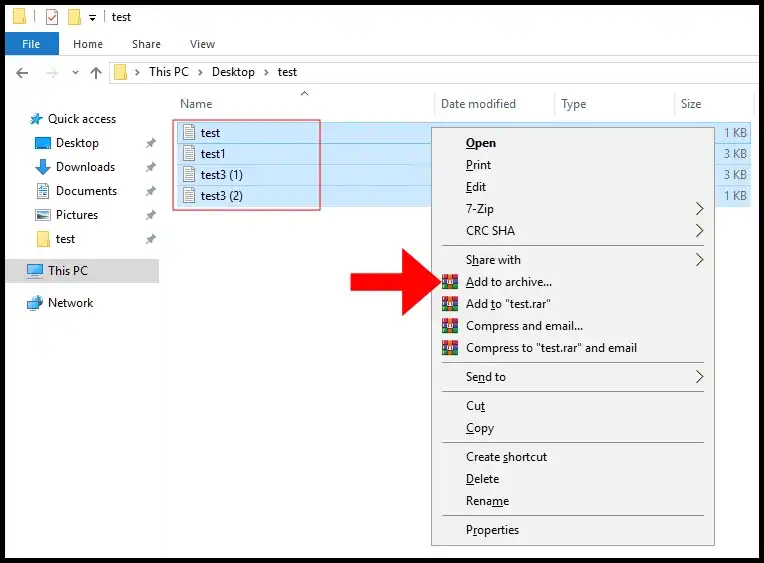
Compress Files and Create Archives
WinRAR compresses files and folders into RAR or ZIP archives to reduce file sizes and simplify storage, transfer and sharing. Create compressed archives containing multiple files or folders, or split large archives into multiple volumes when required.
Open and Extract Archive Files
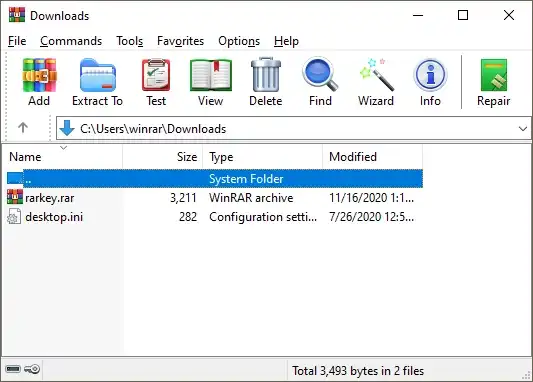
Open and extract RAR, ZIP and other popular archive formats from a single application. WinRAR supports drag-and-drop extraction and provides tools for accessing, organising and managing files stored inside compressed archives.
Encrypt and Protect Archives
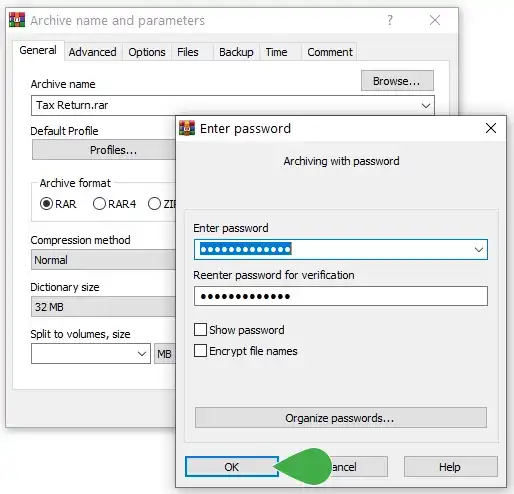
Protect sensitive files with AES-256 encryption and password-protected archives. WinRAR can also create recovery records and repair damaged archives, providing additional options for protecting and recovering important compressed data.
WinRAR Features
Create RAR and ZIP Archives
Create RAR and ZIP archives to compress files, reduce storage requirements and package multiple files together. WinRAR provides advanced compression options for managing large collections of files and data.
Extract RAR, ZIP and Other Formats
Open and extract RAR, ZIP and other popular archive formats with WinRAR. Access compressed files from a single application and extract individual files or complete folders when needed.
AES-256 Encryption
Protect archives with AES-256 encryption and password protection. Encrypted archives can help prevent unauthorised access to sensitive files and information.
Split and Multivolume Archives
Divide large archives into multiple volumes for easier storage, transfer and sharing. Multivolume archives can be useful when files need to fit within specific storage or transfer limits.
Recovery Records and Archive Repair
Add recovery records to archives to help recover data if an archive becomes damaged. WinRAR also includes tools for repairing certain corrupted archives and recovering accessible files.
Backup and File Management
Use WinRAR’s integrated backup features, file version retention and timestamp options to manage archived copies of files. Drag-and-drop support and archive management tools simplify everyday file organisation.
Compare WinRAR Plans
Choose a WinRAR licence based on the number of computers that need access to the software. A single-user licence covers one computer for business use, while multi-user licences are available for teams and organisations. WinRAR licences are perpetual, so there is no recurring subscription for the licence itself. Optional support and maintenance packages can provide additional upgrade and support benefits.
WinRAR — Single-User Licence
Perpetual WinRAR licence for one computer
The single-user WinRAR licence provides full access to the software on one computer. It is suitable for individuals who need file compression, archive extraction, encryption and file management without a recurring software subscription.
From $29.00 one-time
£21.65 | €25.40
- 1 user / computer
- Perpetual licence
- RAR and ZIP compression
- Extract popular archive formats
- AES-256 encryption
- Archive recovery and repair
WinRAR — 2–9 User Licence
Multi-user WinRAR licensing for small teams
The 2–9 user licence provides WinRAR licences for multiple computers and reduces the per-user purchase price compared with a single-user licence. Each user or computer requires its own licence.
From $21.00/user
£15.67 | €18.40
- 2–9 users / computers
- Perpetual licences
- RAR and ZIP compression
- Extract popular archive formats
- AES-256 encryption
- Archive recovery and repair
WinRAR — 10–24 User Licence
Volume licensing for businesses and teams
The 10–24 user licence provides WinRAR licences for larger teams at a lower per-user price. Each licensed user or computer can use the software under the applicable WinRAR licensing terms.
From $16.00/user
£11.94 | €14.02
- 10–24 users / computers
- Perpetual licences
- RAR and ZIP compression
- Extract popular archive formats
- AES-256 encryption
- Archive recovery and repair
Prices shown are indicative and may vary by country, currency, taxes, promotions and the purchase terms offered by the software provider. WinRAR’s published US prices are shown excluding applicable taxes, while the final price may depend on your location and order details. Always check the provider’s purchase page for the final price and applicable licensing terms before buying.
Questions? We have answers.
WinRAR is file compression and archive management software for creating, opening, extracting and managing compressed files. It supports RAR and ZIP archives as well as many other popular archive formats.
WinRAR can compress files, create and extract archives, encrypt files, split large archives into multiple volumes, create recovery records and provide backup and file management features.
Yes. WinRAR can open and extract ZIP files as well as create new ZIP archives. It also supports RAR and many other popular archive formats.
Yes. WinRAR is the Windows version of the RAR archiver and can create RAR archives with advanced compression, encryption, recovery and multivolume features.
Yes. WinRAR supports AES-256 encryption for password-protected archives. Encryption can help protect the contents of an archive from unauthorised access.
WinRAR provides a 40-day free trial. After the trial period, users who want to continue using the software under a valid licence must purchase a licence.
No. WinRAR licences are perpetual and valid for a lifetime. A separate Support & Maintenance Package can provide access to upgrades and updates during its applicable period.
A WinRAR licence is perpetual and can be used for the lifetime of the licence. The licence does not expire like a standard annual software subscription.
WinRAR includes archive repair features that can attempt to recover data from certain damaged archives. Recovery records can also be added when creating archives to provide additional protection against archive damage.
Yes. WinRAR can split archives into multiple volumes, allowing large collections of files to be divided into smaller parts for storage, transfer or sharing.
Yes. WinRAR supports AES-256 encryption for password-protected archives, helping protect sensitive files stored inside compressed archives.
Yes. WinRAR can be installed in server or network environments, but a separate licence is required for each client or workstation on which WinRAR is installed, used or accessed.
A single-user licence covers one computer. If WinRAR is required on multiple computers or workstations, the appropriate number of multi-user licences must be purchased.
Yes. Current WinRAR versions support Windows 11 and Windows 10. Check the current system requirements before installing WinRAR on older versions of Windows.