
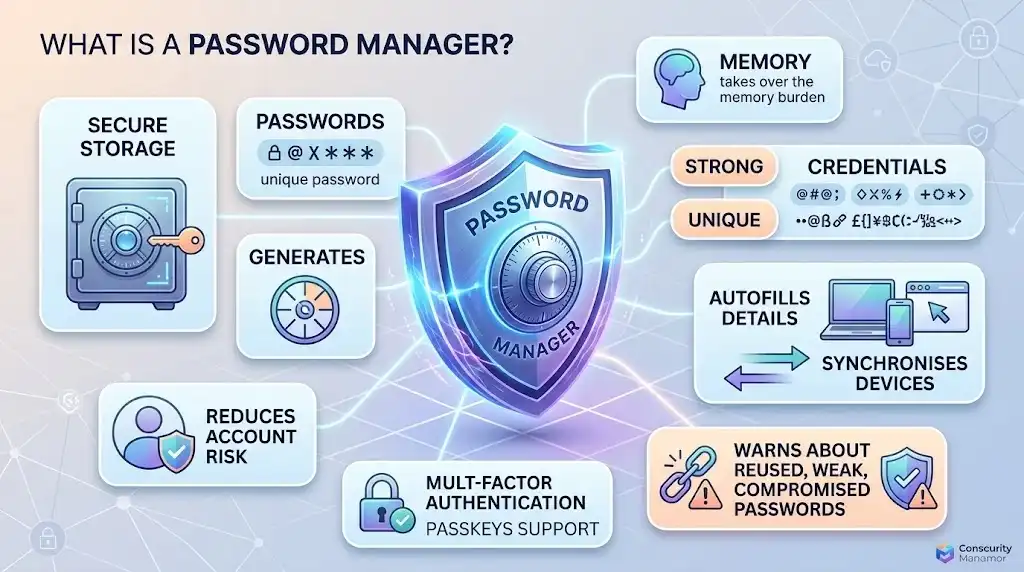
A password manager is software that securely stores, generates and manages passwords in an encrypted vault, allowing you to use strong, unique credentials without having to memorise them all. Most password managers can also autofill login details, synchronise credentials between supported devices and warn about weak, reused or compromised passwords. Using a reputable password manager can substantially reduce the risks created by password reuse and weak credentials, although it does not eliminate the need for multi-factor authentication, secure devices and careful online behaviour.
Key Takeaways
- A password manager stores your login credentials in an encrypted vault protected by a master credential or equivalent authentication mechanism.
- It can generate long, unique passwords for individual accounts, removing the need to reuse passwords.
- Autofill reduces the need to manually type credentials and can help reduce exposure to some phishing techniques.
- Multi-device synchronisation allows passwords to remain available across supported computers, phones and browsers.
- Many password managers also support passkeys, secure notes, payment information, two-factor authentication codes and security alerts.
- The master password or primary authentication method is particularly important because compromising it can put the contents of the vault at risk.
- F-Secure ID Protection is a relevant option for people who want password management combined with identity monitoring and breach alerts.
- F-Secure Total combines its password manager and identity protection with antivirus, scam protection and VPN functionality.
What Is a Password Manager?
A password manager is an application designed to store and manage passwords and other sensitive credentials securely. Instead of remembering dozens of individual passwords, you normally protect a central vault with one strong master password or another secure authentication method.
The manager can then generate a different password for each account and retrieve it when required. NIST specifically recognises password managers as providing both security and convenience because they can generate unique, complex passwords and store them securely in encrypted vaults.
This changes the password problem from:
Remember a different password for every account.
to:
Use a password manager to create and securely retrieve a different password for every account.
That distinction matters because a compromised password should ideally affect only one account rather than providing an attacker with access to several services.
How Does a Password Manager Work?
A typical password manager combines several functions: password generation, encrypted storage, autofill, synchronisation and security monitoring.
1. It generates strong passwords
A password manager can create random passwords that are considerably harder to guess than predictable passwords based on names, dates or familiar phrases.
For example, instead of creating a similar password for several websites, you can generate a separate credential for every account.
The exact password-generation controls vary between products, but useful options can include password length and the inclusion of different character types.
2. It stores passwords in an encrypted vault
The credentials are stored inside a protected vault rather than as ordinary readable text.
Cloud-based password managers generally encrypt vault data before synchronising it between devices. Some services use end-to-end encryption or zero-knowledge designs so that the provider is not intended to have access to the decrypted contents of your vault.
The precise architecture matters when comparing products. Look for clear information about:
- Encryption of stored data.
- Encryption during transmission.
- How encryption keys are generated and protected.
- Whether the provider can decrypt your vault.
- Account recovery procedures.
- Multi-factor authentication.
- Security audits or published technical documentation.
No security architecture makes a password manager completely immune to compromise. The security of the devices, account credentials and software you use also matters.
3. It autofills login details
After you save an account, the password manager can usually recognise the relevant website or application and offer to fill in the username and password.
Autofill improves convenience, but it also has a security benefit. You are less likely to type credentials manually into an unexpected page, and some password managers use the website address to determine whether saved credentials should be offered.
That can be particularly useful against phishing. A convincing fake website may look identical to a legitimate service while having a different domain.
Autofill should not, however, be treated as a complete phishing defence. Attackers can use sophisticated techniques to imitate legitimate login experiences, and users still need to check where they are signing in.
4. It synchronises passwords between devices
A cloud-enabled password manager can synchronise your encrypted vault between supported devices.
For example, you might create a password on a Windows PC and later use the same saved credential on an Android phone. The exact operating systems, browsers and applications supported vary by provider.
F-Secure ID Protection, for example, currently supports Windows, macOS, iOS and Android. Its password autofill is available for Chrome, Edge and Firefox.
5. It can identify weak or reused passwords
Some password managers analyse the credentials stored in your vault and identify passwords that are:
- Reused across multiple accounts.
- Weak or easily guessable.
- Potentially exposed in known breaches.
- Associated with accounts that support stronger authentication but are not configured accordingly.
This makes the password manager useful not only for storing passwords but also for improving an existing collection of credentials.
Why Are Password Managers Important?
The main security advantage is password uniqueness.
If you use the same password for an email account, online retailer and financial service, a breach at one organisation can expose a credential that attackers may try elsewhere.
A password manager makes unique passwords practical because you do not need to remember each one.
This is particularly important as people accumulate more online accounts. Manually creating and remembering dozens of strong, unrelated passwords is difficult, so users often compensate by reusing passwords or making predictable variations.
A password manager removes much of that trade-off.
Are Password Managers Safe?
Reputable password managers are designed with encryption and other security controls to protect the information stored in the vault. NIST recommends password managers because they can improve both password security and usability.
However, the security model introduces an important concentration of risk: the password manager contains many credentials in one place.
That means you should evaluate the provider and configuration carefully.
Protect the master password
The master password should be strong, unique and not reused elsewhere.
If an attacker obtains it, the security of the vault may be significantly weakened, depending on the product’s authentication and encryption architecture.
Choose a password that is difficult to guess but practical for you to use reliably.
Enable multi-factor authentication
Where supported, enable multi-factor authentication on the password-manager account.
This creates an additional authentication requirement beyond the master password. The exact methods available vary between providers.
Protect the device
A secure password manager cannot compensate for a compromised device.
Malware capable of recording keystrokes, controlling a browser session or stealing information from an unlocked device can create risks independently of the password vault’s encryption.
Keep operating systems, browsers and security software updated and use device-level authentication.
Password Managers and Phishing
Password managers can help reduce phishing risk, but they are not a replacement for phishing protection.
A normal phishing attack attempts to persuade you to enter credentials into a fraudulent website. A password manager that recognises website addresses may refuse to autofill credentials on a domain that does not match the saved account.
That creates a useful warning signal.
Some security products go further by detecting malicious or fraudulent websites before you interact with them. This is one reason to distinguish a dedicated password manager from a broader security suite.
The distinction is important when selecting software:
| Capability | Password manager | Broader security suite |
|---|---|---|
| Secure password storage | Core function | May be included |
| Password generation | Usually | Often |
| Autofill | Usually | Often |
| Password security checks | Common | Sometimes |
| Phishing protection | May provide limited assistance | Often more extensive |
| Malware protection | Usually not the primary function | Common |
| VPN | Usually separate | May be included |
| Identity monitoring | Sometimes | May be included |
| Breach alerts | Common in some products | Sometimes |
| Identity recovery | Uncommon | Available with some plans |
A password manager therefore solves one part of the account-security problem. A broader security package may be more appropriate if you want password management alongside malware, scam, privacy and identity protection.
What Should You Look For in a Password Manager?
Strong encryption and a well-designed vault
Security should take priority over cosmetic features. Look for transparent information about encryption, authentication and how the provider protects stored credentials.
A provider should also explain what happens if its infrastructure is compromised.
Password generation
The software should make it easy to create strong, unique passwords whenever you register for a new service or change an existing credential.
The more convenient this process is, the easier it becomes to avoid password reuse.
Reliable autofill
Autofill should work across the browsers and devices you actually use.
Check compatibility before purchasing, particularly if you regularly switch between Windows, macOS, Android and iOS.
Password security monitoring
A useful password manager can identify reused or weak credentials and, where supported, alert you when information associated with your accounts appears in a known breach.
Multi-factor authentication
The password manager itself should support strong additional authentication options where possible.
This is particularly important because the vault may contain credentials for many other services.
Passkey support
Passkeys are increasingly important because they can replace traditional passwords for compatible services.
They use public-key cryptography rather than requiring you to enter a shared secret password. The private key remains on the user’s device or within the relevant credential-management system.
A modern password manager may therefore function as a broader credential manager rather than simply a password database.
Cross-platform support
Check every device you intend to use before buying.
A password manager that works well on a desktop but lacks the browser or mobile support you need can create unnecessary friction.
Recovery options
Password managers deliberately protect the master credential, which creates an important trade-off: stronger protection can mean more difficult account recovery.
F-Secure ID Protection, for example, uses a recovery QR code for its master password. F-Secure states that it cannot restore a forgotten master password because doing so would require access to the password.
Understand the recovery mechanism before storing important credentials in a service.
F-Secure ID Protection: Password Manager Plus Identity Monitoring
F-Secure ID Protection is particularly relevant if you want password management alongside monitoring for exposed personal information.
It provides a password manager that can store credentials, generate strong passwords and identify weak or reused passwords. It also provides automatic credential autofill and identity monitoring for information such as email addresses and certain financial or identification details.
F-Secure currently lists support for Windows 11 and Windows 10 version 21H2 or later, macOS 13 Ventura or later, iOS 18 or later and Android 11 or later.
The important distinction is that ID Protection is more than a conventional password vault. Its identity-monitoring functions can alert you when monitored information is exposed in a breach, making it relevant to people who want password management and identity monitoring in one subscription.
F-Secure Total: Password Management Within a Broader Security Package
F-Secure Total is a better fit when password management is only one part of the protection you want.
Its current feature set combines password management and identity monitoring with antivirus, ransomware protection, scam protection and a VPN. F-Secure also provides breach alerts and identity-theft assistance within its identity-protection offering.
This approach avoids buying separate products for several related security requirements.
The trade-off is that someone who only wants password management may not need the additional security and privacy features included in a broader package.
F-Secure ID Protection vs F-Secure Total
| Feature | F-Secure ID Protection | F-Secure Total |
|---|---|---|
| Password manager | Yes | Yes |
| Password generation | Yes | Yes |
| Autofill | Yes | Yes |
| Password weakness/reuse alerts | Yes | Yes |
| Identity monitoring | Yes | Yes |
| Breach alerts | Yes | Yes |
| Identity theft assistance | Yes | Yes |
| Antivirus | No | Yes |
| Ransomware protection | No | Yes |
| Scam protection | No | Yes |
| VPN | No | Yes |
| Best suited to | Password and identity protection | Broader online security, privacy and identity protection |
The choice therefore depends on scope. Choose ID Protection when password and identity security are the main requirements. Choose Total when those features need to sit alongside antivirus, scam protection and VPN privacy.
What a Password Manager Cannot Protect You From
A password manager is not a complete cybersecurity system.
It does not automatically prevent:
- Malware from infecting your device.
- An attacker from taking control of an already authenticated account.
- Social engineering that persuades you to disclose information.
- Fraudulent transactions made after you have legitimately authenticated.
- A compromised email account from being used to reset other accounts.
- Attacks against the password manager itself.
- Security problems caused by an unsafe or compromised device.
It also cannot make a weak account-security setup safe by itself.
Use unique passwords, enable multi-factor authentication where available, keep software updated and check websites carefully before entering sensitive information.
Password Manager vs Browser Password Storage
Modern browsers commonly include built-in password-management features. These can be convenient and may be sufficient for users with relatively simple requirements.
A dedicated password manager can offer a broader set of functions, such as:
- Cross-browser access.
- Dedicated applications for multiple operating systems.
- Secure sharing.
- More extensive password auditing.
- Identity or breach monitoring.
- Secure notes and other protected information.
- Additional authentication controls.
- Passkey management.
- More granular management of credentials.
The right choice depends on your requirements rather than whether one approach is universally secure.
If your main requirement is simply storing passwords within one browser ecosystem, its built-in manager may be sufficient. If you use multiple browsers, operating systems or devices, or want additional identity and security features, a dedicated product may provide greater value.
Do You Still Need Strong Passwords If You Use a Password Manager?
Yes.
The password manager makes strong passwords easier to use; it does not make password strength irrelevant.
Use a unique password for every account and make important passwords sufficiently long. NIST recommends increasing password length and avoiding commonly used passwords rather than relying on complicated composition rules that encourage predictable substitutions.
For services that support passkeys, consider using them instead of passwords where appropriate.
For particularly important accounts, such as your primary email account, enable multi-factor authentication as well.
Is a Password Manager Worth It?
A password manager is particularly useful if you currently reuse passwords, rely on predictable variations or struggle to remember credentials for multiple accounts.
The strongest practical benefit is not simply storing passwords. It is making secure password behaviour easier to maintain consistently.
For users who want only password management and identity monitoring, F-Secure ID Protection provides a focused option. For users who also want antivirus, scam protection and VPN functionality, F-Secure Total provides a broader security package.
A good password manager should reduce the effort required to use unique credentials while providing strong protection for the vault itself. Once configured, it can make better account-security practices substantially easier to maintain.
Frequently Asked Questions
1. What is a password manager used for?
A password manager securely stores your login credentials, generates strong passwords and can automatically fill them into websites and applications. It allows you to use unique passwords for different accounts without having to memorise every password.
2. Are password managers safe?
Reputable password managers use encryption and other security controls to protect stored credentials. However, no password manager is completely risk-free. Protect the master password or primary authentication method, enable multi-factor authentication where available and keep the devices used to access the vault secure.
3. Can a password manager prevent phishing?
A password manager can help with some phishing attacks by associating saved credentials with particular websites and avoiding inappropriate autofill on different domains. It cannot detect or prevent every phishing attack, so users should still check website addresses and avoid entering credentials through suspicious links or messages.
4. Is it better to use a browser password manager or a dedicated password manager?
A browser password manager may be sufficient if you primarily use one browser and need basic credential storage. A dedicated password manager can be preferable when you need broader cross-platform support, additional security features, password auditing, secure sharing or identity monitoring.
5. What is the best password manager for identity protection?
The appropriate choice depends on the features required. F-Secure ID Protection combines password management with identity monitoring and breach alerts, while F-Secure Total adds antivirus, scam protection and VPN functionality.