
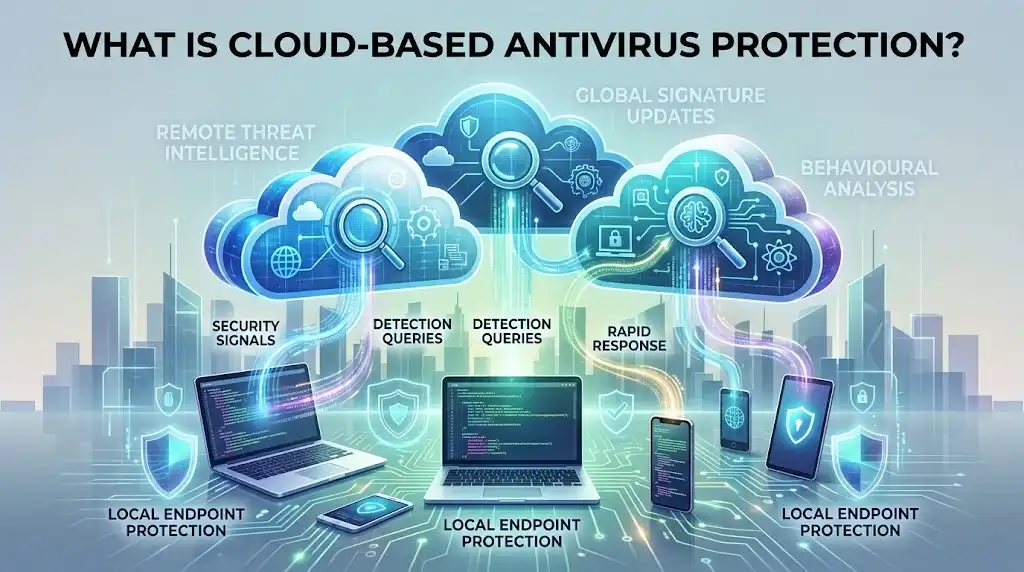
Cloud-based antivirus protection uses internet-connected security services to analyse files, applications, URLs and other security signals using remote threat intelligence, machine learning and other detection technologies. Instead of relying entirely on malware databases stored on the device, cloud protection can send relevant security information to a provider’s infrastructure and return a detection or blocking decision rapidly, helping security software respond to new and emerging threats. Cloud-based antivirus does not mean that your files are simply stored or scanned in the cloud: the endpoint remains protected locally, while cloud services provide additional analysis, intelligence and protection capabilities.
Key Takeaways
- Cloud-based antivirus combines local endpoint protection with remote security intelligence and analysis.
- Cloud services can help identify new threats more quickly than relying solely on conventional security-intelligence updates.
- Antivirus software can use cloud-based machine learning, reputation services, behavioural analysis, sandboxing and threat intelligence.
- A cloud-connected antivirus product can still provide important local protection when an internet connection is unavailable, depending on its design.
- Cloud protection may require security-related information to be transmitted to the provider, making privacy policies and data-handling practices important purchasing considerations.
- Cloud-based antivirus is different from a cloud-managed antivirus platform: one describes how detection or intelligence is delivered, while the other can describe how administrators manage endpoint security.
- Malwarebytes, F-Secure Total, F-Secure Internet Security and VIPRE Antivirus are relevant products for different cloud-assisted or cloud-managed security requirements.
What Is Cloud-Based Antivirus Protection?
Cloud-based antivirus protection is an approach in which antivirus software uses remote infrastructure operated by the security provider to supplement protection running on the user’s device.
A conventional antivirus programme can maintain local malware signatures and detection logic on the endpoint. Cloud protection adds another source of intelligence that can be updated centrally and accessed by many protected devices.
Microsoft describes its cloud protection service as working with Microsoft Defender Antivirus to provide rapid identification of new threats. The service uses distributed resources, machine learning and Microsoft’s security intelligence rather than simply storing antivirus files in the cloud.
F-Secure uses a similar model. Its Security Cloud receives queries concerning potential malicious activity from protected devices and networks, allowing F-Secure to maintain an up-to-date view of the threat landscape and analyse potentially malicious files and behaviours.
The important distinction is therefore:
Cloud-based antivirus is still endpoint protection. The cloud provides additional intelligence and analysis rather than replacing the security software installed on the device.
How Does Cloud-Based Antivirus Work?
Cloud antivirus normally combines several stages rather than sending every file to a remote server for complete analysis.
1. The endpoint detects a potentially suspicious item
The local antivirus engine may encounter a downloaded file, executable, document, script, website or process that requires further analysis.
The software can initially use local signatures, heuristics, reputation information or behavioural rules. If those mechanisms cannot establish whether the item is safe, the product may query its cloud service.
This approach allows common threats to be handled locally while more uncertain cases can benefit from additional remote intelligence.
2. Security information is sent to the provider
The antivirus product may send information needed to assess the threat.
Depending on the provider and feature, this can include a file hash, metadata, URL, application information or other security telemetry. F-Secure states that information sent to its Security Cloud can include file hashes, file names and file paths, while blocked files and related metadata may be processed to analyse malicious content and behaviour.
The exact information collected varies substantially between providers and products.
This makes the provider’s privacy documentation an important part of evaluating cloud-based antivirus.
3. Cloud systems analyse the threat
The provider’s infrastructure can compare the security signal with large, frequently updated sources of threat intelligence.
Cloud systems may use:
- Malware reputation databases
- Machine-learning models
- Heuristic analysis
- Behavioural intelligence
- File analysis
- URL reputation
- Application reputation
- Sandbox analysis
- Threat research
- Telemetry from protected endpoints
Microsoft states that its cloud protection uses large interconnected datasets in the Microsoft Intelligent Security Graph alongside artificial intelligence and machine-learning models to identify new threats dynamically.
Malwarebytes similarly describes its detection architecture as combining signatures, behavioural analysis, heuristics and cloud telemetry.
4. The endpoint receives a decision
The cloud service can return information indicating whether an item is known to be malicious, suspicious or trusted.
The local security product can then block, quarantine or otherwise handle the threat according to its protection rules.
This division of responsibility is important. The endpoint still performs the actual protection action; the cloud provides additional intelligence that can improve the decision.
Why Is Cloud-Based Antivirus Useful?
The primary advantage is the speed at which threat intelligence can be distributed.
Traditional antivirus databases can require updates to reach individual devices. A cloud service can maintain centralised intelligence and make changes available to connected endpoints without requiring every threat-analysis operation to be performed locally.
Microsoft states that cloud protection can identify new threats rapidly and that malware fixes can be delivered through the cloud within minutes in supported configurations rather than waiting for a conventional protection update.
Faster response to emerging threats
New malware can spread before conventional signatures have been distributed to every endpoint.
A cloud service can analyse a newly encountered threat centrally and use the resulting intelligence to protect other connected devices.
This does not guarantee detection of every new threat, but it reduces the dependence on locally stored signatures alone.
Access to large-scale threat intelligence
A cloud security service can aggregate intelligence from a large number of protected systems and security research sources.
That scale can be difficult to reproduce entirely on an individual computer.
Malwarebytes describes its cloud telemetry as contributing to global threat intelligence and continuously refining its detection capabilities.
Less reliance on large local databases
Some detection intelligence can remain in the provider’s cloud infrastructure rather than being stored entirely on every endpoint.
This can reduce the amount of local detection data that needs to be maintained, although the exact impact on storage and system performance depends on the product.
Centralised security updates
A cloud architecture allows the provider to update its central detection infrastructure without requiring every analytical change to be packaged into a traditional local database update.
This is particularly valuable for rapidly changing threats.
Is Cloud-Based Antivirus the Same as Cloud-Managed Antivirus?
No. The terms describe different aspects of antivirus architecture.
Cloud-based detection means the security product uses cloud infrastructure for functions such as threat intelligence, file analysis or detection decisions.
Cloud-managed antivirus means the security product is administered through a web-based management platform.
A product can provide one without necessarily providing the other.
VIPRE Endpoint Security Cloud, for example, combines endpoint protection with a cloud-based management console. VIPRE’s current endpoint documentation lists cloud-based management, centralised policy management, web-based administration and cloud-based agent roaming support.
VIPRE also uses cloud-based threat intelligence and protection technologies for endpoint security. Its documentation describes cloud-driven active protection, cloud URL lookups and behavioural analysis for emerging threats.
For a home user, the distinction may have little practical significance. For a business managing multiple devices, it can be a major purchasing consideration.
Does Cloud Antivirus Scan Everything in the Cloud?
No.
Cloud antivirus does not necessarily upload every file on a device to a remote server.
Security products can use local scanning for many routine operations and contact cloud services when additional intelligence is needed.
The precise process varies between providers. Privacy documentation should therefore be checked before purchasing, particularly if the device handles confidential business information, regulated data or sensitive personal documents.
F-Secure states that its Security Cloud receives queries concerning potential malicious activity and that files blocked for security reasons may be processed in a safe environment to analyse malicious content and behaviour.
The relevant question is not simply whether an antivirus product is “cloud-based”. It is what information leaves the device, when it is transmitted, why it is processed, where it is processed and how long it is retained.
What Happens When Cloud Antivirus Is Offline?
Cloud-dependent detection features may be unavailable or reduced when an endpoint cannot communicate with the provider.
Local protection can nevertheless continue to operate, depending on the product’s architecture.
Microsoft explicitly describes Defender’s cloud protection as an enhancement to standard real-time protection rather than a replacement for local antivirus capabilities.
This distinction matters for laptops that regularly operate without internet access.
When comparing products, check whether the antivirus can still perform:
- Local signature scanning
- Heuristic analysis
- Behaviour monitoring
- Quarantine
- Real-time file protection
- Scheduled scans
- Local remediation
without an active internet connection.
Cloud intelligence may be unavailable offline, but that does not necessarily mean the entire antivirus product stops functioning.
Cloud Antivirus vs Traditional Antivirus
| Feature | Traditional local-focused antivirus | Cloud-assisted antivirus |
|---|---|---|
| Local malware detection | Yes | Yes |
| Local signatures | Common | Usually still used |
| Cloud threat intelligence | Limited or absent | Core capability |
| Centralised intelligence updates | Less immediate | Rapidly distributed |
| Machine-learning services | May be local | Can use cloud models |
| Behavioural detection | Possible | Often combined with cloud intelligence |
| Offline protection | Generally strong | Usually retains some local protection |
| Internet dependency | Lower | Higher for cloud-specific features |
| Privacy considerations | Primarily local processing | Requires consideration of transmitted security data |
| Centralised management | Not necessarily available | Common in business cloud-managed products |
The distinction is not absolute. Modern antivirus products are generally hybrid rather than purely local or purely cloud-based.
A more useful comparison is therefore how much detection occurs locally, which functions use cloud services and what happens when the endpoint is disconnected.
What Are the Disadvantages of Cloud-Based Antivirus?
Cloud protection provides important advantages, but it introduces trade-offs.
Internet connectivity matters
Cloud-based analysis requires connectivity when a detection function depends on remote services.
A disconnected device may therefore lose access to some of the provider’s latest threat intelligence.
Privacy requires careful evaluation
Security telemetry can contain information about files, applications, URLs and devices.
The data may be necessary for effective threat analysis, but users should understand what is collected and how it is processed.
F-Secure’s privacy documentation illustrates the level of detail that can be relevant: its Security Cloud processing can involve file hashes, file names, file paths and information associated with malicious files.
Cloud outages can affect cloud-dependent features
If the provider’s cloud service becomes temporarily unavailable, cloud-dependent analysis may be affected.
A well-designed endpoint product should retain appropriate local protection, but the exact fallback behaviour varies.
Enterprise data governance can be more complicated
Businesses may need to consider data residency, contractual terms, regulatory requirements and security policies before allowing endpoint telemetry or suspicious files to be processed by an external cloud service.
Cloud antivirus can therefore simplify security operations while simultaneously introducing additional data-governance considerations.
Is Cloud-Based Antivirus More Secure?
Cloud-based architecture can improve protection against emerging threats, but “cloud-based” does not automatically mean that one antivirus product is more secure than another.
Security effectiveness depends on the complete detection and prevention architecture.
A strong product should combine cloud intelligence with appropriate local protection, including signatures, heuristics, behaviour monitoring, real-time scanning, ransomware protection and web protection.
Microsoft describes its modern Defender architecture as combining cloud-delivered protection with local and cloud technologies including memory scanning, behaviour monitoring and machine learning.
The purchasing decision should therefore focus on how the cloud is used, rather than simply whether the product advertises cloud technology.
What Should You Look for When Choosing Cloud Antivirus?
1. Cloud threat intelligence
Check whether the product uses a continuously updated cloud intelligence service rather than simply offering cloud-based account management.
2. Real-time protection
Cloud intelligence is most useful when integrated with real-time endpoint protection that can act on threats as they are encountered.
3. Behavioural and heuristic detection
Cloud analysis becomes more useful when combined with local and cloud-assisted methods capable of identifying previously unknown or modified threats.
4. Ransomware protection
Ransomware protection can use several detection layers, including behavioural monitoring, controlled-folder or protected-folder mechanisms and cloud intelligence.
5. Web and URL protection
Cloud-based reputation services can rapidly classify websites and URLs. VIPRE’s endpoint documentation, for example, describes checking visited URLs against a cloud-based global threat-intelligence network.
6. Privacy controls
Review what data is transmitted to the provider and whether the product provides appropriate controls for telemetry, suspicious-file submission and other cloud services.
7. Offline protection
Check which functions continue working without internet access.
8. Platform support
Verify compatibility with the operating systems actually used across your devices.
9. Licence and device limits
Compare the number of devices included in each plan. A multi-device subscription can be more appropriate for households using several computers and mobile devices.
10. Management requirements
Businesses should determine whether they need a cloud-based administrative console, centralised policies, reporting, remote response and endpoint isolation in addition to cloud-assisted malware detection.
Cloud-Based Antivirus Software Worth Considering
Malwarebytes
Malwarebytes is relevant for users who want a multi-layered antivirus product that incorporates cloud intelligence alongside local detection technologies.
Malwarebytes states that its Katana detection engine combines signature scanning, behavioural analysis, heuristics and cloud telemetry. Its real-time protection continuously monitors system activity, while its current Windows and macOS products provide multiple scan types and quarantine capabilities.
This makes Malwarebytes particularly suitable when the priority is layered consumer malware protection rather than simply maintaining a conventional local signature database.
F-Secure Internet Security
F-Secure Internet Security combines antivirus protection with ransomware protection, browsing protection and banking and shopping protection.
F-Secure’s broader security architecture uses its Security Cloud for threat analysis, with cloud queries helping the provider maintain current threat intelligence.
The product is a sensible option when you want conventional endpoint antivirus combined with cloud-assisted threat intelligence and web-focused security features without requiring the broader VPN and identity-protection package included in F-Secure Total.
F-Secure currently lists Internet Security from £39.99 per year on its UK website. That is UK-specific pricing and should not be treated as an international price.
F-Secure Total
F-Secure Total is appropriate when cloud-assisted antivirus is only one part of the security package you need.
Total combines antivirus and ransomware protection with VPN, scam protection, password management and identity-protection features. F-Secure currently supports Windows, macOS, Android and iOS, subject to its stated operating-system requirements.
F-Secure’s UK store currently lists one-year plans for one, three and five devices at £59.99, £79.99 and £99.99 respectively. Two-year options are also available. These prices are specific to the UK store and can differ internationally.
VIPRE Antivirus
VIPRE is relevant where cloud-assisted endpoint protection and threat intelligence are important considerations.
VIPRE’s cloud endpoint technology combines antivirus, behavioural analysis and cloud-driven protection, while its cloud platform provides centralised management. Current VIPRE documentation lists ransomware and zero-day detection, process blocking, quarantine, cloud-based management and cloud-based roaming support across supported endpoint editions.
The specific capabilities and licensing model depend on the VIPRE edition. Business users should distinguish consumer antivirus from VIPRE’s Endpoint Security Cloud and EDR offerings before purchasing.
MacKeeper
MacKeeper is a Mac-focused option rather than a general multi-platform antivirus suite.
Its current antivirus provides real-time protection, full and custom scans, background scanning and malware removal or quarantine. MacKeeper states that its antivirus protects macOS against viruses, Trojans, worms and spyware.
MacKeeper is therefore more relevant if your requirement is antivirus protection specifically for a Mac rather than a cross-platform cloud-security subscription. Its current product information also identifies macOS as its platform.
Which Cloud Antivirus Should You Choose?
Choose Malwarebytes when layered malware protection, behavioural analysis, heuristics and cloud telemetry are the primary requirements.
Choose F-Secure Internet Security when you want antivirus, ransomware and web protection without paying for the additional VPN and identity features in Total.
Choose F-Secure Total when you want antivirus protection combined with VPN, scam protection and identity-protection capabilities across multiple supported devices.
Choose VIPRE Antivirus when cloud-assisted endpoint protection is required and the specific VIPRE edition provides the management and protection capabilities your environment needs. VIPRE’s cloud endpoint products are particularly relevant to organisations managing multiple devices.
Choose MacKeeper when the requirement is focused specifically on protecting a Mac with real-time antivirus and additional Mac maintenance and privacy tools.
Cloud-based antivirus is most useful when it complements strong local protection rather than replacing it. When comparing products, examine the detection technologies, privacy practices, offline capabilities, supported devices, licence terms and additional security features rather than choosing solely because a product uses the cloud.
Frequently Asked Questions
1. What is cloud-based antivirus protection?
Cloud-based antivirus protection uses remote security infrastructure to supplement antivirus software running on a device. The cloud can provide threat intelligence, machine learning, reputation checks and other analysis while the endpoint continues to perform local protection and remediation.
2. Does cloud antivirus require an internet connection?
Cloud-dependent detection features require an internet connection to communicate with the provider. Many antivirus products retain local signatures, heuristics and other protection mechanisms that can continue operating offline, but the exact capabilities vary by product.
3. Is cloud-based antivirus better than traditional antivirus?
Cloud-based antivirus can respond rapidly to emerging threats because centralised intelligence can be updated without relying exclusively on conventional local database updates. It is not automatically better, however; effective protection depends on the combination of cloud intelligence, local detection, behavioural monitoring, real-time protection and other security layers.
4. Does cloud antivirus upload my files?
Not necessarily. Different products transmit different types of security information. Some may send hashes or metadata, while suspicious files may be submitted for additional analysis under particular circumstances. Check the provider’s privacy policy to understand exactly what information is collected and processed.
5. What is the best cloud-based antivirus for multiple devices?
The appropriate product depends on the devices and features required. Malwarebytes is suitable for multi-layered malware protection, while F-Secure Total is appropriate when antivirus needs to be combined with VPN, scam and identity-protection features. Businesses needing centralised cloud management should also consider whether an endpoint-security platform such as VIPRE’s cloud offerings is more appropriate.